Remote Service Administration Tool also known as RSAT, A new service created by Kipesoft .INC, If you wish to know how RSAT Works and How to use it you should read this before using, A
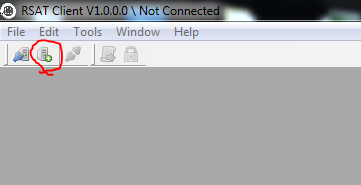
S WE STATED AT THE SETUP OF THE SOFTWARE THIS SOFTWARE IS SAFE HOWEVER KIPESOFT IS NOT RESPONSIBLE FOR HOW YOU USE THIS SOFTWARE. So let's get started. To use RSAT You need a FTP Server, it doesn't have to be big or fast, Just has to be reliable. RSAT Uses FTP To communicate to RSAT Servers, Let's jump into how to make your first RSAT Connection. Download and install RSAT Open up the program and click File>New Connection, Or click the icon from the toolbar menu of a server with a plus icon.
UPDATE: This is not RSAT as in Remote Server Administration tool from Microsoft. This does not have to do anything with Remote Server Administration tool, This is Remote Service Administration Tool. (RSAT). The big difference between RSAT From Microsoft and RSAT From Kipesoft IS That RSAT From Kipesoft is a way for controlling another computer with RSAT Server / Client through FTP. However Microsoft's version is a whole other idea, Please do not get confused with RSAT From Microsoft and RSAT From Kipesoft.
<- This will bring up the new connection settings, Let me explain how you should set it up.
1. It's recommended to create a directory on your FTP Server to something you will remember, In this case i will create a directory called RSAT. I did this process using a FTP Client, You can use Filezilla or a online FTP Client, I personally use WinSCP.

2. Using my FTP Login information i used in the proper fields (Example Information), I also put both HTTP And FTP Working directory fields to point out to my RSAT Directory i have created, Since i created it in my public_html folder, i will use it
http://testwebsite.com/rsat for HTTP and for FTP i will use the full directory path of RSAT Server so it would be :
ftp://testwebsite.com/public_html/rsat and i lastly chosen the path where the connection files will be created and the name for the directory it will create on my computer.
3. Once you click Create and Compile you will be asked if you want to load up the connection key (Loading up the connection key.ckf it has created) You can choose yes or not, However in your desired location you chose to create the RSAT Connection on your computer you find a directory after the name you chose for your connection. Inside it there will be a file called
connection key.ckf that will be used to load AND Connect to your RSAT Server, and there will be another directory called
executable where will contain compiled data for your RSAT Server, Which you will have to transfer to another computer and run the program. No user interface will popup since it will be running in the background, The best way to check if it's running or not is by opening
Task Manager>Processes> And checking if the name of your exe file is running in the processes, If it is then it's all good to go.
4. Back to the RSAT Client with your connection loaded you will see two tabs, One called
Console, And another called
Working Directory. Working directory is a simple way of seeing what files/directories are in your FTP Server of your working RSAT Directory, Console is where all the magic happens... To get a list of commands you can send to a RSAT Server you can type in
HELP <SERVER> Into the console and you will get a list of commands on what you can send to the server, Which i will explain how in a second, To get console commands you can use in the console you can type in
HELP <CONSOLE>
GETTING STARTED WITH SENDING COMMANDS

To send commands to a RSAT Server you simply use the send command button in the top toolbar and a window will popup showing 3 Fields of 3 commands you can send, This does not mean you can send 3 commands at the same time, It's just a easy way of using the RSAT Command Syntax Which Is
[COMMAND1],[COMMAND2],[COMMAND3] To use the commands in this Syntax in the HELP <SERVER> Command in the console the syntax is already planned out for you. Let's work with a command that uses 3 Commands.
[SYSTEM CMD], [COMMAND], [TRUE/FALSE] - {RUNS A CMD COMMAND, THIRD COMMAND INDICATES IF CMD AUTO TERMINATES TRUE = TERMINATE FALSE = KEEP WINDOW OPENED} (PLEASE NOTE THAT ALL COMMANDS ARE IN LOWERCASE AND IS CASE SENSITIVE) So this command uses 3 Commands, [1],[2],[3] the first command is
[system cmd] and the second command points out that you can submit your own command to CMD which i will use
[@ECHO OFF Hello World] - That will display a command box with a text saying "HELLO World", But remember the command can be anything you want if CMD Will recognize it, And the last command is a simple True Or False input, As note from the command says True will terminate the window after the command was submitted and False will keep the window open after a command was Submitted, I want the window to be kept open so i will type in false for the third command. So we are going to send this command to our RSAT Server: [system cmd],[@ECHO OFF Hello World],[false] Just by typing "system cmd" in Command 1 in the window of submit command, And "@ECHO OFF Hello World" into the Second command and lastly "false" into the last command. This is what it should look like after:

Before we click Submit, As you can see there is a Checkbox called "Clean", Checking it will delete the previous commands from the server before uploading the new commands, This feature is unchecked by default because it takes a bit longer to submit a command but you should only use it if your having problems submitting a command. Once your ready click "Submit" and you can watch the status from the bottom of the of the window, Once completed after a second the window will close by it's self. If failed the window will be kept open giving you a chance to retry submitting. If you have the RSAT Server running in your own computer or another computer you will see after a few seconds a Command prompt window popping up saying "Hello World", If this happens you have successfully made a RSAT Connection to another PC. if commands use less than 3 you can leave one or two commands blank, but sending invalid commands to a RSAT Server can result to a Unknown Command error.
RETRIEVING INFORMATION THROUGH CONSOLE
Some commands may upload information as data out.dat or image.dat, and for logs it's log.dat, The console can grab these files and quickly display it for you, or you can go to the Working Directory tab, Refresh the page and select a item and click download, But just by typing in
GET SERVER <DATA> into the console, The console WILL Download and display the file to you, Same with Image.dat

However the command is different for each file, You cannot use console to download other files from the server as the console cannot recognize them, You need to use the working directory file for that.
GET SERVER <DATA> = Download data_out.dat and displays it in the console
GET SERVER <LOG> = Downloads log.dat and displays it in the console
GET SERVER <IMAGE> = Downloads image.dat and uses image viewer to view the file
If you transfer a file from the computers filesystem to your server you will need to use working directory to retrieve the file as the file is saved after the file name you got from the other PC.
Q/A List
Q: When i send a command that requires the server to upload a file called data_out.dat and i go back to console to retrieve the file, it doesn't exist.
A: RSAT Isn't a fast service, As it grabs commands every 2 seconds and processes them for one second, Which takes 3 seconds every time depending on your server speed. You will have to wait a bit before expecting the server to reply back, Especially when the server is uploading big files such as images, videos, etc.. You can set the grab time by submitting this command to the server:
[SET GRABTIME], [MILSECONDS] command to the server by milliseconds, However.. If the server is already uploading a file your previous upload request command will be ignored UNTIL The server finishes uploading your file. There is no command to cancel uploads at the moment.
Q: Does RSAT Use up a lot of bandwidth?
A: No, RSAT Only sends data in bytes, Which means it will be fast too. Unless you were to transfer bigger files back and forth. This won't be RSAT'S Fault.
Q: How do i maintain access with RSAT?
A: You can submit the
[RSAT -STARTUP] command to the server to make it write it's self into the users start up registry so that the RSAT Service will start every time when Windows start. if you wish to remove the RSAT Service from start up you can use the
[RSAT -STARTUP -R] Command to remove it from start up
Q: How to close the RSAT Server on the other PC?
A: You can simply go to task manager and end it's process.. Or you can submit this command to the server:
[RSAT -DISCONNECT] and RSAT Will close all it's services safely and close it's self, This will not delete RSAT Service on the computer, you need to delete the exe file manually
Q: Why doesn't a window show for the RSAT Server i created?
A: RSAT Is a service, The RSAT Client we created creates and connects to RSAT Servers using FTP, A RSAT Server is a service for window to enable connections from your connection key to connect to the computer, There is no point of making the window as it is also impossible to make a user interface for a win32 service unless it comes to showing message boxes.
If you have any more questions you can ask through the feedback page or Kipesoft Community.. Thanks for all the support once again, RSAT Is a free open source program that can be downloaded from SourceForge, You can get the download link in our downloads page through the Networking Tools Category